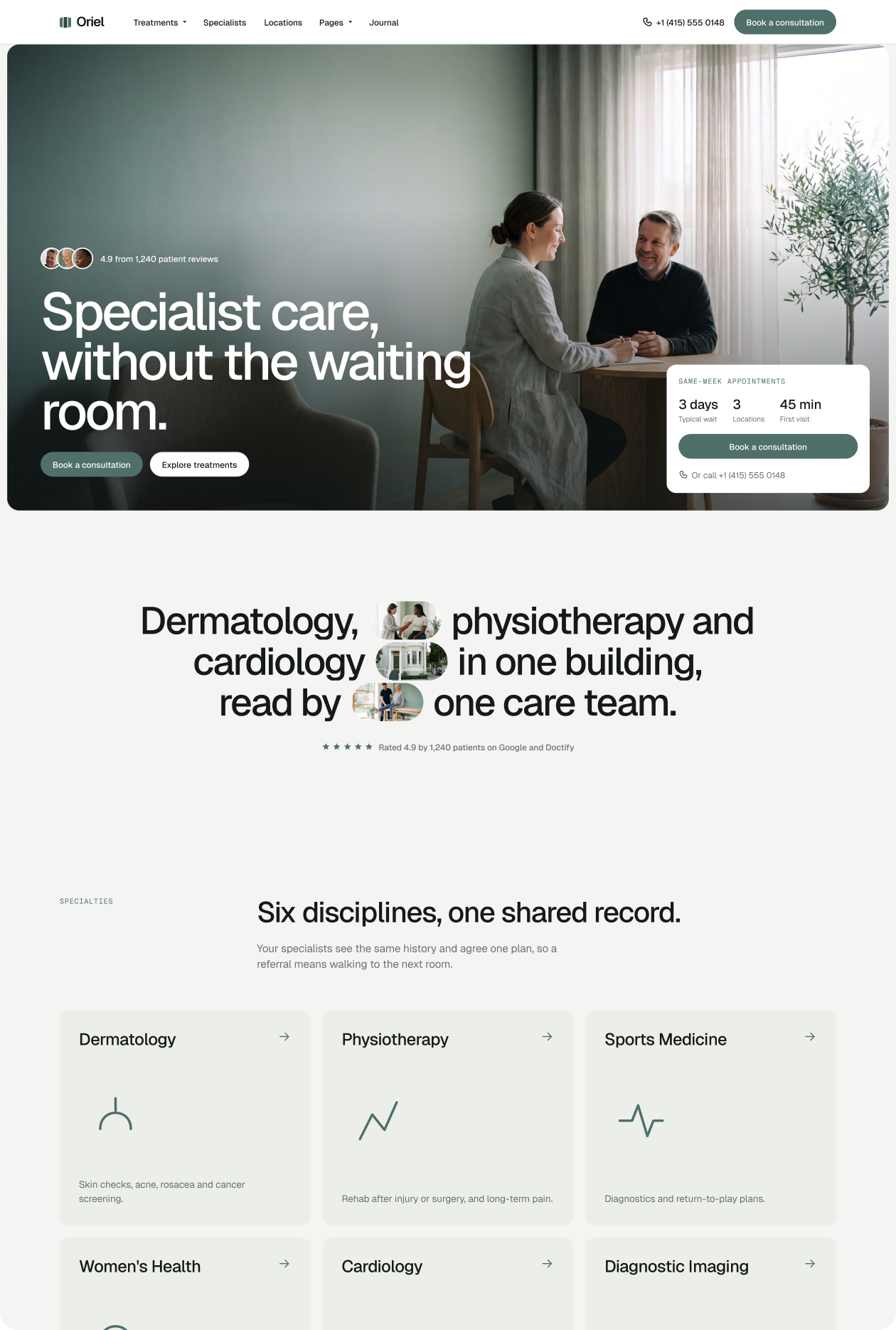
How to Build a Private Clinic Website That Turns Visitors Into Bookings

How to Build a Private Clinic Website That Turns Visitors Into Bookings in 2026
Most patients do not walk into a private clinic without researching it first. They visit the website, look for prices, read about the specialists, check the location, and look for a reason to trust the practice. If the website does not answer those questions clearly, patients leave. They book somewhere else.
This guide walks you through building a private clinic website that earns that trust and converts it into bookings. Each section covers one question patients ask, why it matters, and how to build the page that answers it. We use Oriel - a Webflow template built for private clinics - to show exactly which pages cover each need.
In summary
- Patients check prices, specialist credentials, location, and booking options before they book
- A clinic website needs at least six core pages to answer those questions
- Price transparency increases conversions - hiding prices makes patients leave
- Specialist profiles with credentials and languages build the trust that drives bookings
- Webflow forms should collect contact details and appointment preferences only - not clinical intake data
- Oriel includes 23 pages, four CMS collections, and three booking flow variants, ready to launch
What do patients check before booking a private clinic?
Patients check five things before they book: whether the clinic treats their condition, how much it costs, who will treat them, where the clinic is, and how easy it is to book. A website that answers all five clearly will convert. A website that hides any of them will lose patients to a clinic that does not.
This is not a guess. It is how patients shop for private healthcare in 2026. Price-comparison sites and online reviews have made patients expect transparency. If your website does not provide it, patients assume the clinic has something to hide.
Should a private clinic website show prices?
Yes. Showing prices reduces drop-off and increases booking rates. Patients who arrive at a booking form without knowing the price often abandon it. Patients who see prices upfront are more likely to complete the booking because they have already accepted the cost.
A Pricing and Insurance page gives patients the information they need before they commit. It also filters out patients who cannot afford the service, which saves the front desk time. Oriel includes a dedicated Pricing and Insurance page with CMS-managed treatment prices, duration, and specialist links.
Does a clinic website need specialist profiles?
Yes. Specialist profiles are one of the highest-impact pages on a clinic website. Patients want to know who will treat them, what qualifications that person has, and whether the specialist speaks their language.
Oriel includes a Specialists page and individual Specialist Detail pages. Each profile is managed via CMS and includes credentials, languages spoken, and a direct booking link. This removes one of the biggest barriers to conversion: patients who are not sure their specialist is qualified enough.
How many booking options should a clinic website offer?
A clinic website should offer at least two booking options: an online request form and a phone number. Some clinics also offer live chat or WhatsApp. The key is that every page on the site makes the next step obvious.
Oriel includes three booking flow variants - a short form, a longer multi-step request, and a direct specialist booking page. The three variants let a clinic test which flow converts best without rebuilding the site. Each variant is a separate page in Webflow, so the clinic can use one or all three.
Can Webflow forms collect patient medical data?
No. Webflow does not sign a Business Associate Agreement (BAA). Under HIPAA, a BAA is required for any vendor that handles protected health information on behalf of a healthcare provider. Without a BAA, Webflow cannot be used to collect, store, or process protected health information.
This means booking request forms on a Webflow site should collect contact details and appointment preferences only - name, phone number, preferred date, and preferred specialist. Clinical intake forms, medical history, and symptom descriptions should be handled through a dedicated, HIPAA-compliant scheduling or patient management tool such as Jane App, Acuity with HIPAA add-on, or a compliant EHR platform.
Oriel’s booking forms are designed to collect contact details and appointment preferences only. They do not ask for clinical information. This keeps the site within Webflow’s scope and routes sensitive data to the right tool.
For specific compliance guidance for your practice, consult a healthcare compliance advisor.
What pages does a private clinic website need?
A private clinic website needs at least six core pages: a home page, a treatments page, a specialists page, a pricing and insurance page, a booking page, and a locations page. Each page answers one of the five questions patients ask before booking.
Oriel includes 23 pages across all of these categories, plus a Patient Guide, a Patient Stories page, and a Journal for ongoing content. Here is how the key pages map to patient needs:
How do you show multi-location clinics on a website?
Multi-location clinics need a Locations page that lists all sites with addresses, contact details, and opening hours. Each location should have its own page or section so patients can find the details for the site nearest to them.
Oriel includes a Locations page that handles multi-site clinics cleanly. Each location entry is CMS-managed so the team can update hours or contact details without a developer. The Specialists CMS collection links each specialist to their primary location, so patients can see exactly where their chosen specialist works.
How do you build a private clinic website step by step?
Building a private clinic website in Webflow with Oriel takes five steps. Each step covers one layer of the site.
Step 1: Set up your CMS collections.
Oriel has four CMS collections out of the box: Specialties, Treatments, Specialists, and Articles. Start by entering your data into each collection. Treatments need a duration, price, linked specialty, linked specialists, and patient FAQs. Specialists need credentials, languages, and booking links.
Step 2: Build your home page.
Oriel includes three home page variants. Choose the one that fits your clinic’s tone - minimal and calm, or warmer and more editorial. The hero should name the clinic, state the main specialty or positioning, and show a clear call to action pointing to the Treatments or Book page.
Step 3: Set up your booking pages.
Choose one or more of the three booking flow variants. Configure each form to collect name, phone number, preferred date, and preferred specialist only. Connect form submissions to your scheduling or patient management tool via Zapier, Make, or a native integration. Do not route clinical intake data through the Webflow form.
Step 4: Add your pricing and insurance page.
Enter your treatment prices into the Treatments CMS collection. Publish the Pricing and Insurance page with a clear explanation of what is included, what is not, and how to claim on insurance if applicable. A transparent pricing page reduces pre-booking drop-off significantly.
Step 5: Publish and connect your booking tool.
Before going live, test every booking form end to end. Confirm that submissions arrive in your scheduling tool and that the confirmation email fires correctly. Check that no form asks for clinical information. Then publish the site and set up your custom domain in Webflow.
What is the fastest way to launch a private clinic website?
The fastest way to launch a private clinic website is to use a purpose-built Webflow template and fill it with your content. Building a clinic site from scratch in Webflow takes four to eight weeks for an experienced developer. Starting with a template like Oriel cuts that to one to two weeks, because the pages, CMS structure, and booking flows are already built.
Oriel is $129 for the Webflow template plus the Figma source file. The Figma file lets your designer adjust branding, colors, and typography before development begins, which speeds up the build further.
If you want the site launched without managing the build yourself, our team customizes Oriel in five days. See the customization service.